
The complete crypto wallet guide for 2026. Hardware vs software, custodial vs non-custodial, seed phrase security and a full comparison table. Know before you store
Table of Contents
- What Is a Crypto Wallet? (And What It Actually Stores)
- The Five Types of Crypto Wallets Explained
- Hot Wallets vs Cold Wallets: A Clear Comparison
- Hardware Wallets Deep Dive: The Gold Standard for Crypto Wallet Security
- Software Wallets: Power and Convenience, With Trade-offs
- Custodial vs Non-Custodial: Who Really Holds Your Keys?
- The 10 Biggest Crypto Security Threats in 2025
- How to Store Crypto Safely: A Step-by-Step System
- Seed Phrase Security: The One Thing You Cannot Get Wrong
- Master Wallet Comparison Table
- Crypto Wallet Security Checklist
- Frequently Asked Questions
01What Is a Crypto Wallet? (And What It Actually Stores)
Here is the part that confuses almost everyone when they first get started. A crypto wallet does not store your Bitcoin or Ethereum the way a physical wallet stores dollar bills. Your actual coins live on the blockchain and they never move off it. What a wallet stores is your private key, which is the cryptographic proof that you are authorized to spend funds associated with your public address.
Think of it this way. Your public address is like a bank account number that anyone can see and send funds to. Your private key is the signature that authorizes withdrawals. If someone else gets your private key, they own your crypto, full stop. The blockchain does not know or care about your name, your legal identity, or your story. It only recognizes valid cryptographic signatures.
A wallet is therefore better understood as a key management tool than a storage device. It generates keys, keeps them organized, signs transactions on your behalf, and gives you an interface to interact with the blockchain. Some wallets are built into web browsers. Others are physical devices that look like USB sticks. Some exist purely on paper. The medium changes but the underlying function stays the same.
The Three Core Components of Every Wallet
- Private Key: A 256-bit number that authorizes spending. Never share this with anyone, ever.
- Public Key: Derived mathematically from the private key. Used to generate your wallet address.
- Seed Phrase (Recovery Phrase): A human-readable backup of your private key, typically 12 or 24 words. This is the master key to everything.
Understanding this distinction between keys and coins is not just academic. It is the foundation of every good decision you will make about crypto wallet security going forward.
INTERNAL LINK OPPORTUNITY 2 “It is the foundation…” → Link to a beginner-level article like How Blockchain Transactions Work or What Is a Private Key in Crypto? Suggested anchor text: “crypto wallet security”
02The Five Types of Crypto Wallets Explained
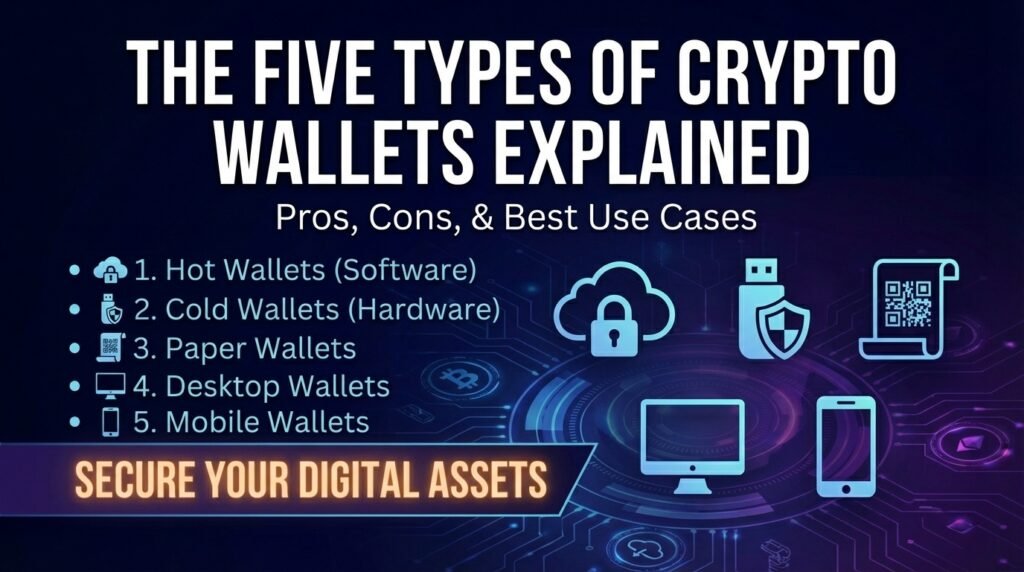
The crypto wallet ecosystem splits into five distinct categories. Each sits at a different point on the spectrum between convenience and security. Knowing where each one lives on that spectrum is the first step to building a storage strategy that matches your actual needs.
Hardware Wallets
Hardware wallets are physical devices, usually resembling a small USB drive or a credit card, that store your private keys entirely offline. When you want to send crypto, the transaction is signed inside the device itself and the private key never touches your internet-connected computer. This design makes them extraordinarily resistant to remote attacks. Even if your computer is completely compromised by malware, a hardware wallet will still protect your funds.
Ledger and Trezor dominate this category and have for years. Newer entrants like Coldcard (beloved by Bitcoin maximalists) and Foundation Passport offer more open-source transparency. Hardware wallets cost between 50 and 250 dollars depending on the model and features, which is a tiny price compared to what they protect.
INTERNAL LINK OPPORTUNITY 3 “Ledger and Trezor dominate…” → Link to your hardware wallet reviews or comparison post, e.g. Ledger vs Trezor: Which Hardware Wallet Should You Buy? Suggested anchor text: “Ledger and Trezor”
Software Wallets (Desktop and Mobile)
Software wallets are applications you install on a computer or smartphone. They are non-custodial, meaning you control your private keys, and they give you full access to DeFi protocols, NFT marketplaces, and decentralized exchanges without any middleman. MetaMask, Exodus, Trust Wallet, and Phantom fall into this category.
The trade-off is that these wallets are hot wallets. They stay connected to the internet, which means they are exposed to phishing attacks, malware, and browser-based exploits. They are excellent for actively trading or using dApps but they are not where you want to keep your long-term savings.
INTERNAL LINK OPPORTUNITY 4 “…DeFi protocols, NFT marketplaces, and decentralized exchanges…” → Link to your DeFi getting-started guide or yield farming intro article. Suggested anchor text: “DeFi protocols” or “decentralized exchanges”
Web Wallets (Browser Extensions)
Web wallets operate as browser extensions or web interfaces. MetaMask is the most famous example. They are frictionless and deeply integrated into the DeFi ecosystem, which makes them extremely popular. They also carry significant risk because they interact directly with smart contracts and websites, some of which are malicious.
A phishing site that looks identical to a legitimate DEX can drain your web wallet in seconds if you blindly approve a transaction without reading it. Web wallet security is as much about user discipline as it is about the software itself.
Paper Wallets
A paper wallet is exactly what it sounds like: your public and private keys printed on a piece of paper, sometimes along with a QR code. In the early days of Bitcoin this was considered the gold standard for cold storage. Today it is largely obsolete because paper is fragile, fire and water destroy it easily, and the process of securely generating a paper wallet is more technically demanding than most people realize.
For most users in 2025, a hardware wallet does everything a paper wallet does but in a far more durable and user-friendly package. Paper wallets still have niche use cases, like gifting small amounts of crypto, but they should not be your primary storage strategy.
Custodial Wallets (Exchange Wallets)
When you buy Bitcoin on Coinbase, Binance, or Kraken and leave it sitting in your exchange account, you are using a custodial wallet. The exchange holds your private keys on your behalf. You get a username and password login but you do not actually control the underlying crypto in a cryptographic sense.
This is convenient. It means no seed phrases to manage and easy access to trading pairs. However, it also means you are exposed to exchange hacks, platform insolvency, regulatory freezes, and withdrawal restrictions. The phrase “not your keys, not your coins” was coined specifically because of custodial wallet risk.
INTERNAL LINK OPPORTUNITY 5 “…exchange hacks, platform insolvency…” → Link to a post like The FTX Collapse: What Crypto Investors Learned About Custodial Risk or your exchange safety guide. Suggested anchor text: “exchange hacks, platform insolvency”
03Hot Wallets vs Cold Wallets: A Clear Comparison
The most fundamental division in crypto wallet security is between hot storage and cold storage. Every other consideration flows from this one.
A hot wallet is any wallet that maintains an active connection to the internet. A cold wallet is one that is kept offline. That is the entire distinction, but the security implications are enormous.
| Feature | Hot Wallet | Cold Wallet |
|---|---|---|
| Internet Connection | Always online | Offline or air-gapped |
| Accessibility | Instant, from any device | Requires physical device |
| Security Level | Medium | Very High |
| Best For | Daily trading and DeFi use | Long-term holding (HODLing) |
| Cost | Usually free | $50 to $250+ for hardware |
| Private Key Location | On internet-connected device | On the physical device, offline |
| Hack Risk | Higher (remote attacks possible) | Very low (must be physically stolen) |
| Recovery Option | Seed phrase backup | Seed phrase backup |
| Examples | MetaMask, Trust Wallet | Ledger, Trezor, Coldcard |
The takeaway from this comparison is not that hot wallets are bad or that cold wallets are the only answer. It is that they serve different purposes. A smart crypto storage strategy uses both. Think of it like your personal finances: you keep spending money in a checking account for easy access and larger savings in a locked vault.
INTERNAL LINK OPPORTUNITY 6 “A smart crypto storage strategy uses both.” → Link to your portfolio management guide or a post on sizing your hot vs cold wallet allocation. Suggested anchor text: “smart crypto storage strategy”
04Hardware Wallets Deep Dive: The Gold Standard for Crypto Wallet Security
If you are serious about crypto wallet security, a hardware wallet is non-negotiable for any holdings you cannot afford to lose. This section goes beyond the marketing claims to explain why hardware wallets are so effective, what their actual limitations are, and which ones deserve your trust.
How Hardware Wallets Actually Work
Hardware wallets use a chip, often called a Secure Element (SE) chip, to generate and store your private keys. This chip is designed to be tamper-resistant. Even if someone physically dismantles the device, extracting the key from the chip requires sophisticated laboratory equipment and still often fails due to built-in protections.
When you initiate a transaction on your computer or phone, the unsigned transaction data is sent to the hardware wallet over USB or Bluetooth. The wallet displays the transaction details on its own screen, you confirm it with a physical button press, the device signs it internally using your private key, and sends only the signed transaction back to your computer. Your private key never leaves the device. Your computer never sees it.
This architecture defeats virtually every form of remote attack. Keyloggers, screen capture malware, clipboard hijackers, phishing pages: none of them can steal a key that never appears on your computer.
The Major Hardware Wallet Brands Compared
| Brand | Model | Price (USD) | Coin Support | Bluetooth | Open Source | Screen |
|---|---|---|---|---|---|---|
| Ledger | Nano X | $149 | 5,500+ | Yes | Partially | Color OLED |
| Ledger | Nano S Plus | $79 | 5,500+ | No | Partially | Small OLED |
| Trezor | Model T | $219 | 1,800+ | No | Fully | Color Touchscreen |
| Trezor | Safe 3 | $79 | 1,800+ | No | Fully | Small Screen |
| Coldcard | MK4 | $157 | Bitcoin only | No | Fully | Small Screen |
| Foundation | Passport Batch 2 | $199 | Bitcoin only | No | Fully | Color LCD |
| Keystone | Pro | $169 | 1,000+ | No | Partially | Large Touchscreen |
| BitBox | BitBox02 | $148 | Multi-edition | No | Fully | Small OLED |
INTERNAL LINK OPPORTUNITY 7 After the hardware wallet table → Link to your dedicated Best Hardware Wallets of 2025 review post. Suggested anchor text: “See our full hardware wallet reviews”
What Hardware Wallets Cannot Protect You Against
Hardware wallets are powerful but they are not magic. Understanding their limitations is part of knowing how to store crypto safely.
- Physical theft with PIN cracking: If someone steals your device and your PIN is weak or written down nearby, they may eventually gain access.
- Supply chain attacks: Buying a used hardware wallet or purchasing from unofficial resellers risks receiving a compromised device. Always buy directly from the manufacturer.
- Firmware exploits: While rare, vulnerabilities in wallet firmware have been discovered. Keeping firmware updated and buying from brands with active security teams mitigates this.
- The $5 wrench attack: If someone knows you hold significant crypto and threatens you physically, no amount of cryptographic security saves you. Consider using a passphrase to create a plausible deniability wallet.
- User error during seed phrase backup: If you lose your seed phrase and your device breaks, your funds are gone. The hardware wallet protects you from hackers but not from your own mistakes.
05Software Wallets: Power and Convenience, With Trade-offs
Software wallets are where most active crypto users spend their time. They are the gateway to DeFi, NFTs, Web3 gaming, and decentralized exchanges. Choosing the right one and configuring it correctly matters a great deal for your day-to-day crypto wallet security.
Top Software Wallets by Use Case
| Wallet | Platforms | Networks Supported | DeFi Ready | Best For |
|---|---|---|---|---|
| MetaMask | Browser, Mobile | EVM chains (100+) | Yes | Ethereum and EVM DeFi |
| Trust Wallet | Mobile | 70+ blockchains | Yes | Multi-chain mobile users |
| Phantom | Browser, Mobile | Solana, Ethereum, BTC | Yes | Solana ecosystem |
| Exodus | Desktop, Mobile | 260+ assets | Yes | Beginners wanting clean UI |
| Electrum | Desktop | Bitcoin only | No | Bitcoin power users |
| Rabby Wallet | Browser | EVM chains | Yes | Transaction pre-simulation |
| Coinbase Wallet | Browser, Mobile | Multi-chain | Yes | Coinbase ecosystem users |
| Uniswap Wallet | Mobile | EVM chains | Yes | Uniswap-focused trading |
INTERNAL LINK OPPORTUNITY 8 “MetaMask” in the table or nearby text → Link to your How to Set Up MetaMask: Step-by-Step Guide tutorial. Suggested anchor text: “MetaMask”
INTERNAL LINK OPPORTUNITY 9 “Phantom” → Link to your Best Solana Wallets post or Solana yield guide. Suggested anchor text: “Phantom”
How to Harden a Software Wallet
A software wallet in its default configuration is not as secure as it can be. A few targeted steps dramatically improve your posture.
- Use a dedicated browser profile or even a dedicated machine for your crypto activities. Mixing crypto with general web browsing dramatically increases your attack surface.
- Install only from official sources. Always verify the developer name in the Chrome Web Store or App Store before installing. Fake MetaMask extensions have stolen millions.
- Enable biometric lock or a strong PIN on your mobile wallet so physical theft does not immediately translate to fund loss.
- Never import your seed phrase into an online form, a cloud notes app, or a photo taken on your phone. These are the most common paths to loss.
- Regularly audit connected dApps in your wallet settings and revoke any approvals you no longer use. Tools like Revoke.cash make this simple for Ethereum.
- Consider pairing your software wallet with a hardware wallet for transaction signing. Many modern software wallets support this hybrid setup.
06Custodial vs Non-Custodial: Who Really Holds Your Keys?
This is the most consequential choice in how to store crypto safely, and it is one that most beginners make without fully understanding what they are deciding.
The Custodial Model
A custodial wallet is one where a third party holds your private keys. Your exchange account, your account on a centralized lending platform, and any platform that says “we keep your assets safe” is custodial. You are trusting that company’s security practices, solvency, regulatory compliance, and organizational continuity.
The collapses of FTX, Celsius, Voyager, and BlockFi were brutal reminders of how this trust can be misplaced. In every case, users who kept funds on these platforms lost access, sometimes permanently. The crypto was there on paper but the private keys were controlled by entities that turned out to be insolvent or fraudulent.
INTERNAL LINK OPPORTUNITY 10 “The collapses of FTX, Celsius, Voyager, and BlockFi…” → Link to a dedicated article on the lessons from these collapses, or your exchange risk guide. Suggested anchor text: “collapses of FTX, Celsius, Voyager, and BlockFi”
Custodial wallets are not inherently evil. They are appropriate for small amounts you plan to trade actively, for users who genuinely cannot manage their own key security, and as a temporary holding spot before moving funds to self-custody. Coinbase, Kraken, and Gemini are regulated, insured to varying degrees, and have strong security track records. But even the best custodian carries counterparty risk that self-custody does not.
The Non-Custodial Model
A non-custodial wallet gives you full control of your private keys. No company can freeze your account, no bankruptcy filing locks your funds, and no regulator can instruct a third party to restrict your access. You are the sole sovereign of your assets.
This comes with full responsibility. If you lose your seed phrase and your device breaks, no customer support can help you. There is no password reset. There is no fraud department to call. Self-custody is freedom and responsibility packaged together.
| Factor | Custodial Wallet | Non-Custodial Wallet |
|---|---|---|
| Key Control | Exchange holds keys | You hold keys |
| Account Recovery | Email or ID verification | Seed phrase only |
| Hack Exposure | Exchange server attacks | User-side attacks |
| Regulatory Risk | High (freezes possible) | Low |
| Platform Risk | Insolvency or shutdown | None |
| Ease of Use | Very easy | Moderate to advanced |
| DeFi Access | Limited | Full |
| Recommended Amount | Small trading funds only | All long-term holdings |
The practical recommendation for almost every crypto user is to keep only what you actively trade on custodial platforms and move everything else to a non-custodial wallet, ideally backed by a hardware device for meaningful amounts.
07The 10 Biggest Crypto Security Threats in 2025
Knowing how to store crypto safely means knowing what you are storing it safely against. The threat landscape has evolved considerably. Attackers are more sophisticated, more patient, and more targeted than in the early days of crypto.
1. Phishing Attacks
Phishing remains the single most effective attack vector in crypto. Attackers create near-perfect copies of popular exchange websites, wallet interfaces, and DeFi protocols. They drive traffic to these fake sites through Google Ads, fake social media accounts, and even search engine optimization for common search queries.
The attack goal is almost always either your seed phrase or a malicious transaction approval. A legitimate wallet or protocol will never ask you to enter your seed phrase on a website. If any website asks for it, close the tab immediately.
INTERNAL LINK OPPORTUNITY 11 “Phishing remains the single most effective attack vector…” → Link to a dedicated post on How to Spot Crypto Phishing Scams or your security threats deep dive. Suggested anchor text: “phishing attacks in crypto”
2. Clipboard Hijacking
Malware that monitors your clipboard will silently replace any crypto address you copy with the attacker’s address. You paste what you think is the recipient address, confirm the transaction, and funds go to a completely different wallet. Always verify the first four and last four characters of any address after pasting it. Better yet, use hardware wallet address verification for large sends.
3. Fake Browser Extensions
Counterfeit versions of MetaMask, Phantom, and other popular wallets appear in the Chrome Web Store regularly. They look identical to the legitimate versions. When you import your seed phrase, it goes straight to the attacker. Install wallet extensions only from official websites, and double-check the publisher name and review count before clicking install.
4. SIM Swapping
If you use SMS-based two-factor authentication on your exchange accounts, you are vulnerable to SIM swapping. Attackers social-engineer your mobile carrier into transferring your phone number to a SIM they control, then use it to receive your 2FA codes and access your account. Switch to an authenticator app like Google Authenticator or Authy, or better yet a hardware security key, for every crypto-related account.
5. Malicious Smart Contract Approvals
When you interact with DeFi protocols, you often sign approval transactions that give a smart contract permission to move tokens from your wallet. Malicious contracts exploit these approvals to drain your entire token balance. Before approving any contract, check it on Etherscan, use a wallet like Rabby that simulates the transaction outcome, and revoke approvals you no longer need.
INTERNAL LINK OPPORTUNITY 12 “…revoke approvals you no longer need.” → Link to a how-to guide on revoking token approvals using Revoke.cash or Etherscan. Could be an internal article or a specific category post. Suggested anchor text: “revoke token approvals”
6. Fake Hardware Wallet Scams
A particularly nasty variant involves sending fake hardware wallets to known crypto users. The device may come with a letter claiming your existing wallet needs to be replaced, along with a seed phrase already filled in. Enter that seed phrase and your funds go to the attacker who set it up. Hardware wallets generate their seed phrase during initial setup. If a device comes with a pre-filled seed phrase, destroy it.
7. Rug Pulls and Protocol Exploits
Funds stored in DeFi protocols, yield aggregators, and liquidity pools are exposed to smart contract risk. A bug in the contract code or a deliberate exit by anonymous developers can result in total loss. This is not a wallet security issue per se but it is a storage security issue. Only commit funds to protocols with audited code, established track records, and genuine decentralization.
INTERNAL LINK OPPORTUNITY 13 “…yield aggregators, and liquidity pools…” → Link to your How to Evaluate DeFi Protocol Safety post or your CryptoYield vetting methodology page. Suggested anchor text: “yield aggregators and liquidity pools”
8. Social Engineering via Support Channels
Attackers lurk in Discord servers, Telegram groups, and Twitter replies, posing as support staff. They will message you privately offering to help resolve a wallet issue and ask for your seed phrase to “verify” your account. No legitimate support person from any wallet provider, exchange, or protocol will ever ask for your seed phrase. Ever.
9. Keyloggers and Screen Recorders
Malware that records your keystrokes or captures your screen can intercept seed phrases as you type them. This is why hardware wallets matter: the seed phrase is generated and displayed on the device itself, not on your computer screen. If you must type a seed phrase on a computer, ensure you are using a clean, dedicated machine that has never been used for general internet browsing.
10. Inadequate Physical Security
Many crypto losses are low-tech. Seed phrases written on sticky notes, stored in email drafts, photographed and uploaded to cloud storage, or left visible to family members or visitors represent real risks. The best cryptographic security in the world is undone by a piece of paper left on a desk.
08How to Store Crypto Safely: A Step-by-Step System
Everything covered so far leads to this. Here is a practical, layered system for crypto wallet security that works for someone holding $500 worth of crypto and someone holding $500,000 worth of crypto. The principles are the same even if the specific tools scale up.
Step 1: Decide How Much You Need Liquid vs How Much You Are Holding Long Term
Before touching any wallet, answer this question honestly: how much of my crypto do I realistically need to access in the next 30 days? That amount can stay more accessible. Everything else should go into more secure, less convenient storage. Most people find that less than 10 percent of their holdings need to be liquid at any given time.
Step 2: Set Up a Hardware Wallet for Long-Term Holdings
Purchase a hardware wallet directly from the manufacturer website. Ledger and Trezor both have legitimate official stores. When the device arrives, set it up fresh by generating a new seed phrase on the device itself. Never accept a device that comes with a seed phrase already set.
During setup, you will be shown your seed phrase, typically 24 words. Write them down on paper right now. Confirm them. Put that paper somewhere secure before you do anything else.
INTERNAL LINK OPPORTUNITY 14 “Purchase a hardware wallet directly from the manufacturer…” → Link to your hardware wallet buying guide with affiliate links to official Ledger and Trezor stores. Suggested anchor text: “hardware wallet”
Step 3: Back Up Your Seed Phrase Properly
Your seed phrase is your wallet. If the hardware device is destroyed, lost, or stolen, that phrase is the only thing standing between you and permanent loss. At minimum, have two physical copies stored in two separate locations. Many serious holders upgrade to metal backup plates that survive fire and flooding.
INTERNAL LINK OPPORTUNITY 15 “…metal backup plates that survive fire and flooding.” → Link to your Best Seed Phrase Backup Products roundup or a comparison of Cryptosteel, Bilodex, etc. Suggested anchor text: “metal backup plates”
Step 4: Use a Software Wallet for Active DeFi and Trading
For tokens you plan to trade, stake in DeFi protocols, or use in yield strategies on CryptoYield, a software wallet like MetaMask or Phantom gives you the flexibility you need. Keep only what you are actively using in this wallet. Think of it as your spending account.
If the value in your software wallet grows to a point where it would genuinely hurt to lose it, move the excess to your hardware wallet.
INTERNAL LINK OPPORTUNITY 16 “…use in yield strategies on CryptoYield…” → Link to your yield strategies homepage or the best yield opportunities page on CryptoYield. Suggested anchor text: “yield strategies on CryptoYield”
Step 5: Minimize Exchange Exposure
Use exchanges for what they are good at: converting fiat to crypto and executing trades that require specific pairs. Once you have bought your crypto, withdraw it to your self-custody wallet. Set a personal rule that you will never keep more than a set dollar amount on any single exchange for more than 48 hours.
Step 6: Secure Your Accounts with Proper 2FA
Every exchange account and email account linked to crypto should have two-factor authentication enabled. Use an authenticator app rather than SMS. For maximum security, a hardware security key like a YubiKey makes phishing and SIM swap attacks nearly impossible.
Step 7: Use a Dedicated Email Address for Crypto
Create a brand new email address used only for crypto exchange accounts. Do not use this address for newsletters, shopping, or anything else. This dramatically reduces your phishing exposure because this address will not appear in data breaches linked to other services.
Step 8: Practice Verification Before Every Transaction
Build the habit of verifying the recipient address character by character before sending any transaction above a threshold you set for yourself. Use your hardware wallet screen to verify addresses independently of your computer display. Slow down. Large transactions deserve an extra 60 seconds of verification.
09Seed Phrase Security: The One Thing You Cannot Get Wrong
Your seed phrase (also called a recovery phrase or mnemonic phrase) is the master key to your entire wallet. Every private key in your wallet can be regenerated from it. That means losing your seed phrase when your device fails means losing your funds permanently, and exposing your seed phrase to anyone means they own your funds completely.
No backup exists at Ledger or Trezor headquarters. There is no support ticket process that recovers lost seed phrases. The seed phrase is it.
What You Should Never Do With Your Seed Phrase
- Never type it into any website, even one that looks like your wallet provider.
- Never store it in a password manager, especially a cloud-synced one.
- Never photograph it with your phone. Photos upload to cloud storage automatically on most phones.
- Never email it to yourself. Even encrypted email has failure modes.
- Never store it in a Notes app, Google Doc, or any cloud-connected text file.
- Never share it with a customer support representative from any company.
- Never store all copies in the same physical location.
What You Should Do With Your Seed Phrase
- Write it on paper in clear, readable handwriting immediately during wallet setup.
- Confirm each word carefully against what the device or application shows.
- Store the written copy in a fireproof safe or other secure physical location.
- Create a second copy and store it at a separate physical location, a trusted relative’s home, a safety deposit box, or a similarly secure off-site spot.
- Consider upgrading to a metal seed phrase backup tool like Cryptosteel, Bilodex, or a similar product for fire and water resistance.
- Tell one trusted person where the backup is stored, even if they do not know what it is, so your funds are not permanently lost if something happens to you.
The Passphrase Addition (25th Word)
Most modern hardware wallets support an optional 25th word, called a passphrase, added on top of your 24-word seed. This creates an entirely separate wallet that only exists when the correct passphrase is entered. If your seed phrase is ever discovered, an attacker still cannot access your funds without the passphrase.
This is an advanced feature and it comes with its own risks. If you forget the passphrase, there is no recovery. But for users holding significant amounts, the extra layer of protection is worth it. Keep the passphrase memorized or stored separately from the seed phrase itself.
INTERNAL LINK OPPORTUNITY 17 “Most modern hardware wallets support an optional 25th word…” → Link to a dedicated guide on How to Use a BIP39 Passphrase or your advanced security post. Suggested anchor text: “passphrase (25th word)”
10Master Wallet Comparison Table
To help you make a final decision, here is a comprehensive comparison across the most popular wallets in each category. The right choice depends on your technical comfort, the networks you use, and how much you are storing.
| Wallet | Type | Custody | Networks | Cost | Best For | Security |
|---|---|---|---|---|---|---|
| Ledger Nano X | Hardware | Non-Custodial | 5,500+ assets | $149 | Most users: long-term storage | 9.5/10 |
| Trezor Model T | Hardware | Non-Custodial | 1,800+ assets | $219 | Open-source purists | 9.5/10 |
| Coldcard MK4 | Hardware | Non-Custodial | Bitcoin only | $157 | Bitcoin-focused HODLers | 10/10 |
| MetaMask | Software/Web | Non-Custodial | All EVM chains | Free | Ethereum and DeFi users | 7/10 |
| Phantom | Software/Web | Non-Custodial | Solana, ETH, BTC | Free | Solana ecosystem | 7.5/10 |
| Trust Wallet | Mobile | Non-Custodial | 70+ blockchains | Free | Multi-chain mobile users | 7/10 |
| Exodus | Desktop/Mobile | Non-Custodial | 260+ assets | Free | Beginners, clean UI | 6.5/10 |
| Electrum | Desktop | Non-Custodial | Bitcoin only | Free | Advanced Bitcoin users | 8/10 |
| Rabby Wallet | Browser | Non-Custodial | All EVM chains | Free | DeFi, tx simulation | 7.5/10 |
| Coinbase Exchange | Exchange | Custodial | 250+ assets | Free | Beginners, fiat on-ramp | 5/10 |
| Kraken Exchange | Exchange | Custodial | 200+ assets | Free | Active traders | 5.5/10 |
Security ratings reflect wallet architecture only. User behavior remains the most common point of failure regardless of which wallet you choose.
INTERNAL LINK OPPORTUNITY 18 Below this table → Link to individual wallet review posts for each major wallet listed (e.g., MetaMask Review, Ledger Nano X Review, Trust Wallet Review). One inline link per wallet name in the table is appropriate. Suggested anchor text: Each wallet name (e.g., “Ledger Nano X”, “MetaMask”, “Exodus”)
11Crypto Wallet Security Checklist
Use this checklist to audit your current setup. If you cannot check a box, that is a gap worth addressing today.
Hardware and Seed Security
- Hardware wallet purchased directly from the official manufacturer website
- Seed phrase written by hand during device setup, not generated on a computer
- Two physical copies of seed phrase stored in two separate locations
- Seed phrase never photographed, typed online, or stored in any cloud app
- Device PIN set to at least 8 characters with no obvious patterns
- Optional passphrase enabled for holdings above your personal threshold
Software and Account Security
- Dedicated browser profile or machine used for all crypto activities
- Wallet extensions installed only from official sources with publisher verified
- Authenticator app (not SMS) enabled on all exchange and email accounts
- Dedicated email address used only for crypto platforms
- Strong unique passwords for every crypto-related account
- Token approvals reviewed and unnecessary ones revoked at least monthly
Operational Habits
- Recipient addresses verified character by character before large sends
- Transaction details reviewed on hardware wallet screen before signing
- No more than a defined limit of funds held on any single exchange
- Seed phrase never entered on any website under any circumstances
- Software wallets used only for active amounts, not long-term savings
- Regular firmware updates installed on hardware wallet
INTERNAL LINK OPPORTUNITY 19 After the checklist → Link to a downloadable PDF version of the checklist (if you create one), or to your full Crypto Security for Beginners guide. Suggested anchor text: “Download the full crypto security checklist” or “Crypto security guide for beginners”
12Frequently Asked Questions
What is the safest way to store cryptocurrency? ▼
The safest method for storing cryptocurrency long-term is a hardware wallet combined with secure offline seed phrase storage. Your private keys never touch an internet-connected device, which eliminates virtually all remote attack vectors. For very large holdings, some security practitioners add a passphrase on top of the seed, store multiple encrypted seed phrase copies in geographically separated locations, and use a multi-signature setup where several keys are required to authorize any transaction.
Can I store multiple cryptocurrencies in one wallet? ▼
Yes. Most modern hardware wallets and software wallets support hundreds or thousands of different assets across multiple blockchains. Ledger and Trust Wallet both handle Bitcoin, Ethereum, Solana, and most major altcoins from a single seed phrase. Each coin uses a different derivation path from that master seed, meaning one backup protects everything. The exception is Coldcard and some other Bitcoin-only wallets, which are deliberately limited to Bitcoin for security focus.
What happens if I lose my hardware wallet? ▼
Losing your hardware wallet is not catastrophic as long as you still have your seed phrase. You simply purchase a new hardware wallet from any major brand, choose the restore option during setup, and enter your seed phrase. Your entire wallet including all balances and addresses restores completely. The only scenario where loss becomes permanent is if you lose both the device and the seed phrase simultaneously, which is why having multiple seed phrase backups in separate locations matters so much.
Is it safe to keep crypto on Coinbase or Binance? ▼
Regulated exchanges like Coinbase and Kraken have strong security histories and carry some insurance on custodial holdings. Keeping small amounts on these platforms for trading purposes is a reasonable practice. Where users go wrong is treating their exchange account as a long-term storage solution. Exchange platforms have been hacked, have become insolvent, and have faced regulatory freezes. Any amount you would genuinely hurt to lose belongs in a self-custody wallet, not on an exchange.
How many seed phrase backups should I have? ▼
At minimum two. One primary backup in your home (ideally in a fireproof safe) and one secondary backup at a different physical location. Some people prefer three copies for additional redundancy. The secondary location can be a safety deposit box at a bank, a trusted family member’s secure location, or another property you control. What matters is that no single disaster including fire, flood, or theft can destroy all copies simultaneously.
What is the difference between a seed phrase and a private key? ▼
A private key is a unique cryptographic number that controls a single wallet address. A seed phrase is a human-readable representation of the master key from which all your private keys are derived. Modern wallets are hierarchically deterministic (HD wallets), meaning they generate a tree of key pairs all traceable back to one seed. This is why your seed phrase backs up every address in your wallet rather than requiring you to back up individual keys for each asset.
Can someone hack my hardware wallet remotely? ▼
No. Remote hacking of a hardware wallet is not a realistic threat because the private key never leaves the device. Remote attacks work by accessing keys stored on internet-connected machines. Since a hardware wallet’s keys are isolated inside a secure chip with no internet connection, there is nothing for a remote attacker to reach. Physical attacks on the device are theoretically possible but require sophisticated equipment and usually trigger tamper-evident protections built into quality hardware wallets.
Do I need a hardware wallet if I only have a small amount of crypto? ▼
If you are genuinely just experimenting with a small amount you are prepared to lose, a reputable software wallet is sufficient. However, if you are building a position with the intention of holding long-term or accumulating more over time, getting into good security habits early costs far less than recovering from a hack later. Hardware wallets start at around $50 to $79, which is an easy call once your holdings represent any meaningful portion of your savings.
What is a multi-signature wallet and do I need one? ▼
A multi-signature (multisig) wallet requires multiple private keys to authorize a transaction. For example, a 2-of-3 multisig requires any 2 of 3 designated keys to sign. This means no single point of failure can result in fund loss or theft. Multisig is the gold standard for institutional custody and for individuals holding very large amounts. For most retail users, a hardware wallet with a passphrase provides sufficient security without the complexity of managing multiple keys. Gnosis Safe is the most widely used multisig solution for Ethereum-based assets.
INTERNAL LINK OPPORTUNITY 20 “Gnosis Safe is the most widely used multisig solution…” → Link to your Multisig Wallet Guide or advanced security post. Suggested anchor text: “Gnosis Safe” or “multi-signature wallets”
How do I safely use DeFi without risking my main wallet? ▼
The most practical approach is to maintain a separate hot wallet specifically for DeFi activity and fund it from your hardware wallet only with the amounts you plan to actively deploy. This way, even if a malicious smart contract drains your DeFi wallet, your long-term savings remain untouched. Additionally, use transaction simulation tools like Rabby Wallet that show you exactly what assets will move before you sign anything, and revoke token approvals regularly to limit your exposure window.
INTERNAL LINK OPPORTUNITY 21 “…fund it from your hardware wallet only with the amounts you plan to actively deploy.” → Link to your How to Use DeFi Safely guide or CryptoYield’s yield strategy beginner guide. Suggested anchor text: “safely use DeFi protocols”
Final Thoughts: Security Is a Practice, Not a Product
The single most important insight in this entire guide is that crypto wallet security is not about owning the right product. It is about the right practices applied consistently over time. A Ledger Nano X is a powerful tool in the hands of someone who understands seed phrase security and verifies every transaction. It offers almost no protection to someone who photographs their seed phrase and approves transactions without reading them.
On CryptoYield, the goal is to help you grow your crypto holdings through smart yield strategies. But yield means nothing if your funds are not properly secured in the first place. The best yield is the one you actually get to keep.
Start with the basics: understand what a wallet actually does, move your long-term holdings to self-custody with a hardware wallet, store your seed phrase properly, and build the verification habits that make you an extremely difficult target. Then you can explore yield opportunities knowing your foundation is solid.
Crypto gives you the power to be your own bank. That power comes with the responsibility of being your own security department. The good news is that doing it well is not that complicated. It just requires knowing what actually matters and acting on it. Read about complete crypto yield and passive income from it .